Canva: 7 Exciting Launches in Canva Create!

Exciting new updates and design tools we’ve all been waiting for! Canva has just announced seven highly anticipated updates to their design tools, based on customer feedback. Check out Canva’s release notes below to learn more about these exciting new features!
Canva has been in the graphic design game for almost a decade now. Back then, having design skills was starting to become a must-have in the workplace. Unfortunately, most design tools were a bit of a nightmare – too complex, too expensive, or just too time-consuming to use. Canva saw this struggle and decided to swoop in and save the day!
Canva has come a long way since its launch almost ten years ago. With over 125 million users worldwide, Canva has become a go-to platform for designing. What’s even more fantastic is the active community around Canva who is not afraid to share their thoughts and opinions.
Canva is known for its responsiveness to the needs of the creative and marketing communities. They recognise that these professionals have specific requirements and understand their product wishlist better than anyone. In line with their mission to empower people to design anything, Canva has made it a priority to listen and take action. As a result, their Canva Visual Suite products are now faster, more efficient, and more creative than ever before.
During the recent Canva Create event, Canva not only announced a range of new products but also included seven highly-requested features from their community. These additions, including professional design options such as Layers and Gradients, along with accessibility tools like video captions and descriptive text, make Canva’s platform even more inclusive and user-friendly.
Edit easily with Layers
Canva has introduced a new Layers tool in response to the requests of thousands of users. This tool allows for faster and easier editing of designs, particularly those with multiple elements or more complex designs. Users can adjust elements without affecting other parts of the design and can easily select, reposition, or delete elements as needed.
Yes, that’s correct! With the Layers tool, you can easily manage all the elements in your design without affecting the other parts. It gives you a quick overview of all the elements and their properties, allowing you to edit them easily. This can be especially useful for complex designs with many different elements that need to be managed individually.
Amp up the colour with Gradients
With Gradient fills, you can now add depth and dimension to your designs. You can choose from a wide range of preset gradients, or create your own custom gradient using the colour picker tool. You can adjust the angle, opacity, and position of the gradient, giving you complete control over the look and feel of your design. Gradient fills are a great way to add visual interest and make your designs stand out.
With the gradient fill tool, you have the ability to customise the colours to your liking. You can choose from a range of preset options, such as linear and radial styles, or you can use the color picker to select your own colors and create a unique gradient. The possibilities are endless, and you can easily experiment until you achieve the perfect look for your design.
Accessible design made easy
Canva’s commitment to making design accessible to everyone is unwavering. They believe that everyone should be able to design regardless of their abilities, which is why they continue to invest in accessibility tools. It’s clear that Canva’s users share this belief, as they have received countless requests for their latest accessibility feature.
Canva has recently introduced a new feature that allows users to add alt text for media, images, and elements, giving additional context for those with visual impairments or accessibility needs. This feature is essential for creating designs that can reach the widest possible audience, and Canva is proud to support this important cause. With this alt text, assistive technologies and search engines can identify the content and read it aloud to people who are accessing your designs, or even crawl and rank your website better.
Get a better view with Layout Guides
Maintaining brand consistency is key for organisations, but it can be a challenge. One important aspect is being able to precisely control details like spacing and gutters to ensure that designs consistently hit the mark. This is especially crucial for marketing teams tasked with upholding a brand’s tone and visual identity. We’ve heard from many of you about the need for a layout control feature, and we’re excited to announce that it’s now available in our design suite.
With Canva’s new Layout Guides feature, designers now have greater control over their designs. This new tool allows you to choose from pre-set guides or create custom ones that match your brand’s precise visual design. It’s the perfect solution for marketing teams who need to maintain consistency in their brand’s look and feel. This feature has been a top request from our users, and we’re excited to make it available to everyone in Canva.
New Position tools for total precision
Canva users can now take advantage of an advanced positioning and sizing tool to help them place elements on a page with precision. This is particularly helpful for designers, marketers, and creatives who need to ensure that their designs are aligned and sized correctly. The tool was developed in response to requests from Canva users who needed more control over the placement of their design elements.
With Canva’s new Position tools, designers can now have complete control over the positioning, alignment, spacing, and sizing of their elements. Simply select one or multiple elements and open the Position panel to customize everything from one convenient location.
Plus, bringing an element’s position forward or backward in your design is easier than ever before. You can adjust the element’s sizing, rotation, and ratio to your liking and space elements exactly how you want them on the page.
The world’s most popular fonts, now in Canva
Canva has partnered with Monotype, a renowned font foundry, to expand its font library. This partnership will bring 953 of the world’s most popular Latin fonts and 191 non-Latin fonts to Canva’s content offering, providing designers with an even greater range of options for their designs.
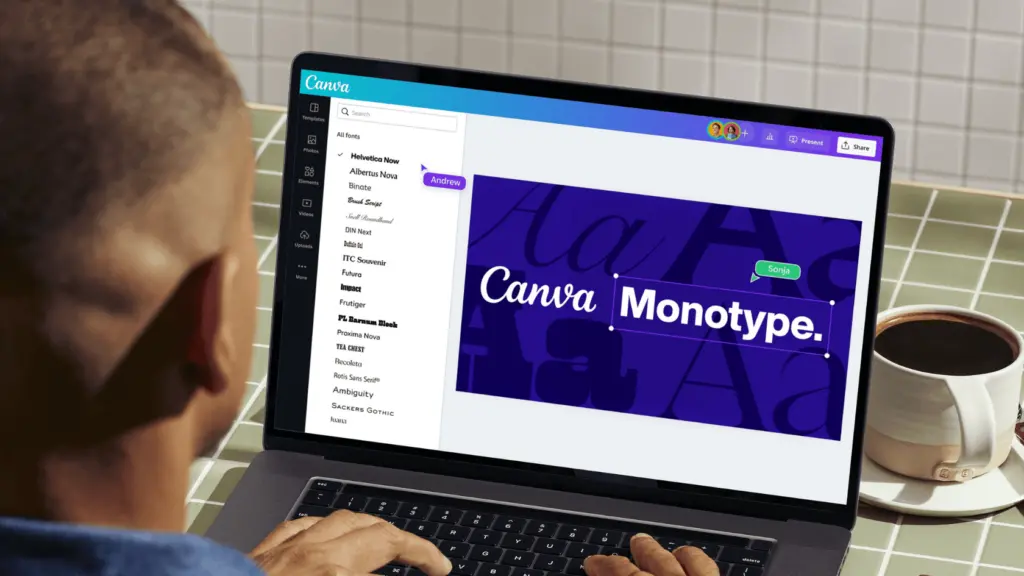
Canva’s new partnership with Monotype means that users will now have access to some of the world’s most recognizable fonts, including Arial, Avenir, Courier, Helvetica, and Times New Roman. This addition will not only offer more variety for basic font needs but also provide a significant upgrade for design-specific fonts.
We’ve updated Design Imports
Canva makes it easy to bring your existing designs into our platform by allowing you to import files from various formats like PowerPoint, PhotoShop, Illustrator, or PDFs. Once imported, these files can be converted into editable Canva designs. You can then customize them with ease, add your own creative flair, and give your existing work a fresh new look.
Canva has recently introduced new improvements to the quality and fidelity of the design imports feature. In addition to this, the platform has launched the Design Imports feature within the editor itself, making it easier and faster for you to transform any file into an editable Canva design. With these upgrades, Design Imports are now more precise than ever before.
Looking to enhance your design game? Barrk can support you with a variety of unique content. Get in touch for more info.
(source: https://www.canva.com/newsroom/news/highly-requested-launches/)