
Google Ads: Display Your Products in 3D and AR
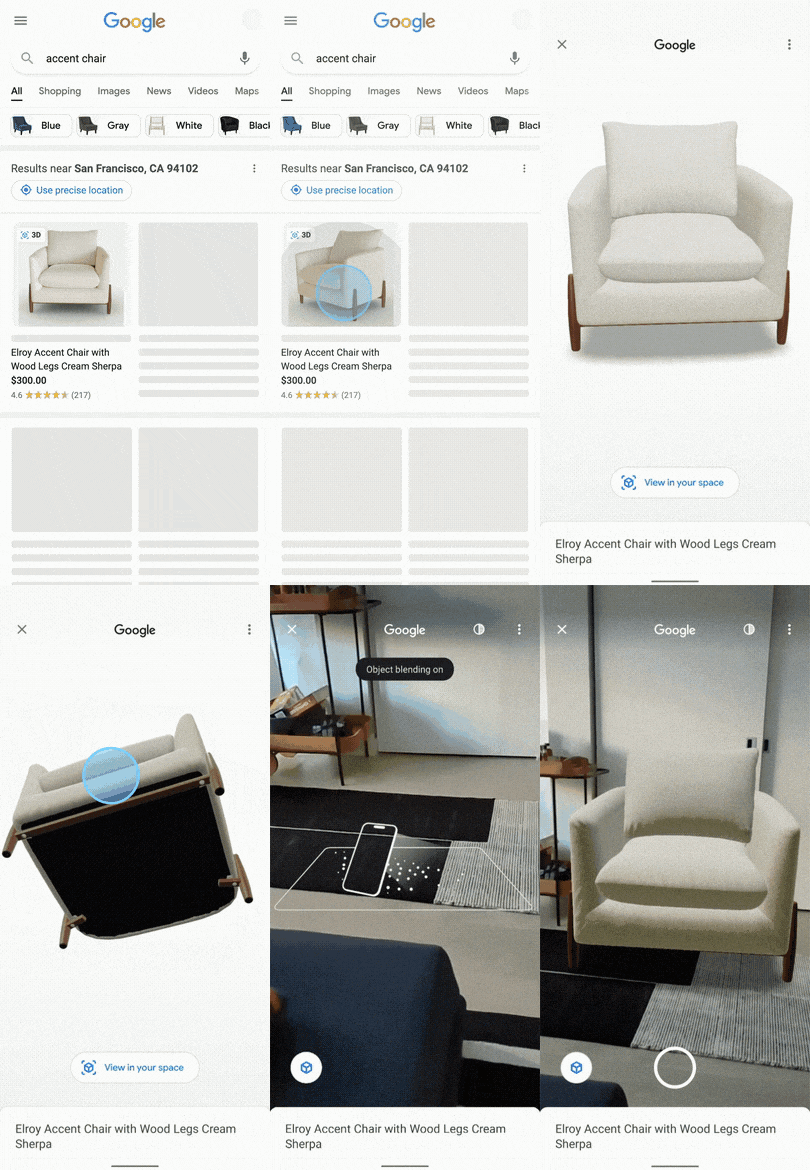
You can display your products in 3D and augmented reality (AR) on Google Search by attributing your existing Manufacturer Center Product feed in with a link to your 3D model. This article explains how the feature works, and how to show your content on Google surfaces.
Benefits
- With augmented reality, your customers can easily envision your product in their own space and get a true sense of how it would look and fit.
- The 3D model feature also allows for a 360-degree view and the ability to zoom in for a closer look at the details.
How it works
Manufacturers can create 3D and AR models of their products on their own, or with the help of Google partners. When your 3D model is ready, you can provide the link (URL) to your hosted model to Manufacturer Center using the 3D Model Link [virtual_model_link] attribute.
- If you’re a brand without a Manufacturer Center account, you need to set up an account first to participate in 3D/AR experiences.
- If you’re a brand or data partner and already use both Merchant Center and Manufacturer Center, you can update your Merchant Center feed with the URL links to your hosted 3D models and synchronize the feed with Manufacturer Center.
- If you’re a data partner, you can submit product feed data, containing the URL of the hosted 3D asset, on behalf of your client brands in Manufacturer Center. Learn more about getting started with a data partner account
Format
Follow these formatting guidelines to make sure Google understands the data you’re submitting.
| Type | URL (Must start with “http://” or “https://”) |
|---|---|
| Limits | Up to 2000 characters |
| Supported file formats | glTF (.gltf), USDZ (.usdz), and GLB (.glb) |
| Repeated field | No |
| File format | Example value |
|---|---|
| Text (TSV) | https://www.google.com/products/xyz.glb |
| XML (Feeds) | <g:virtual_model_link>https://www.google.com/products/xyz.glb |
Not sure where to start? We can help! Get in touch so we can set up awesome AR search ads for your company.
(Source: https://support.google.com/manufacturers/answer/13003911)