
Instagram: Introducing Broadcast Channels

New update from Instagram – keep in mind that this feature is currently in testing, and it will be rolled out globally in the coming months.
Broadcast channels are the ultimate messaging tool that lets you connect with your followers in a snap. Whether it’s using text, photos, videos, voice notes, or polls, broadcast channels let you share everything and anything with your followers in a one-to-many format.
Introducing Broadcast Channels
Instagram’s always on the hunt for ways to make content creators’ lives a little easier. Broadcast channels are now live on Instagram, as unveiled by none other than Mark Zuckerberg himself! With broadcast channels, creators can invite all their followers to join in and chat, building deeper connections with their biggest fans.
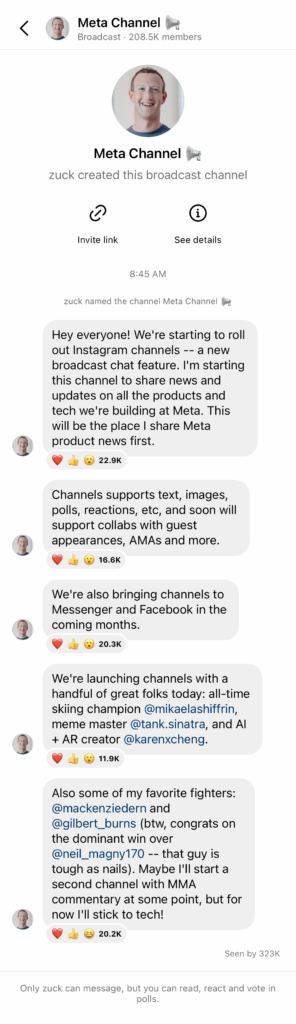
Instagram’s broadcast channels are the new, hassle-free way to keep your followers in the loop. With features like text, photo, video, and voice notes, you can easily share your latest updates and behind-the-scenes moments. And that’s not all – creators can also create polls to get their fans’ thoughts on a new project or design. It’s a one-way street where only creators can send messages, but followers can react and vote in polls.
In the coming months, Instagram will be introducing new features that’ll let creators collaborate with other creators, collect questions for an AMA (ask me anything), and much more!
Check Out Who’s Using Channels
Here are some of the creators who are starting their broadcast channels. Head to their profiles and check out the channel link in their bios (only available on mobile).
- Chloe Kim, Two-time Olympic gold medalist snowboarder: Follow @chloekim
- Josh Richards, Media Personality and Entrepreneur: Follow @joshrichards
- Karen Cheng, Creative Director: Follow @karenxcheng
- Mikaela Shiffrin, Winningest Woman Alpine Skier of All Time: Follow @mikaelashiffrin

How Does It Work?
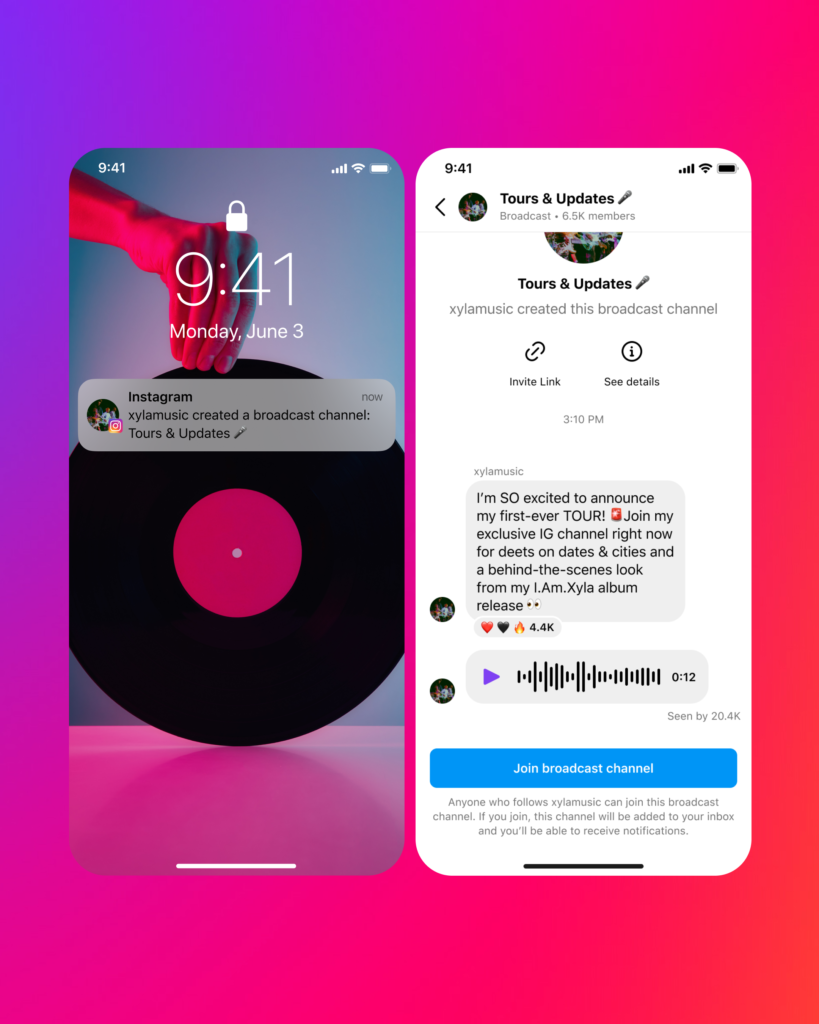
Once a creator gains access, they can start a broadcast channel right from their Instagram inbox. As soon as they send their first broadcast channel message, their followers will receive a one-time notification to join the channel. When the broadcast channel is up and running, creators can also invite followers to join by using the “join channel” sticker in Stories or by pinning the channel link to their profile.
For creators who have Subscriptions and want to create a broadcast channel that’s open to all followers, make sure to set the audience to “all followers.” You also have the option to create a broadcast channel that’s limited to paid subscribers, giving them access to your most exclusive content.
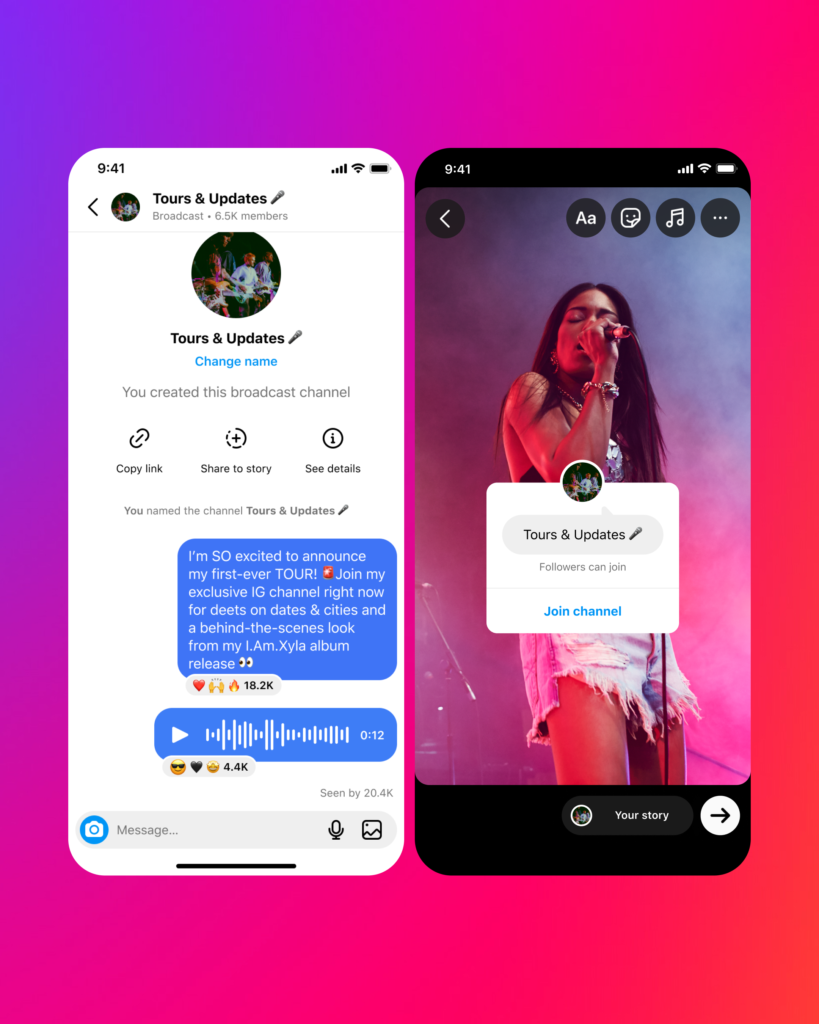
Here’s how to join a broadcast channel:
- To access a broadcast channel, simply tap the link provided on a mobile device via a creator’s Story sticker, the link pinned to their profile or via a one-time notification that’s sent to existing followers when a creator starts a new channel.
- Next, tap “Join broadcast channel” to join the channel. If you’re not yet following the creator, you’ll be prompted to do so.
- Once you’ve joined the channel, it will appear in your Instagram inbox next to other message threads.
- As a follower, you can react to content and vote in polls, but you cannot send messages. You can also share a link to your favourite creators’ broadcast channels so your friends can follow and join.
Once a broadcast channel is live, followers can discover it and view its content. All followers will receive the initial notification inviting them to join the channel, but only those who have joined will get notifications for new updates. Followers have the option to leave or mute the channel anytime, or to disable a creator’s broadcast channel notifications altogether.
Getting Early Access
Instagram is currently testing broadcast channels with a select group of U.S. creators, with plans to expand globally in the near future. If you’re a creator and interested in gaining early access to broadcast channels, you can sign up for the waitlist HERE (please access the waitlist on your mobile device). Keep in mind, spots are limited and early access will be rolled out on a first-come, first-served basis.
Coming Soon to Messenger and Facebook
As Instagram introduces broadcast channels, the feature will also be tested in Messenger and Facebook in the coming months. More details will be shared as broadcast channels become more widely available.
Privacy & Safety
To ensure a safe and inclusive experience, Instagram’s Community Guidelines apply to broadcast channels. Users can report the channel or individual content shared in the channel, which will be removed if it violates Meta policies.
Since broadcast channels are intended for public and discoverable chat experiences, they are managed differently from private messaging on Instagram. Instagram has implemented tools and reviewers to identify, review or remove any content in broadcast channels that may go against Community Guidelines, often before anyone sees it. To understand the contrast between channels and private conversations on Instagram, visit the Help Center.
Need help making the most of the latest features on Instagram? We can help!
Looking to take your business to the next level on Instagram? Barrk Marketing can help you set up your account and make the most of the latest features. We’ll work with you to create a custom strategy that showcases your brand, engages your followers, and drives results. Contact us today!
(source: https://about.instagram.com/blog/announcements/introducing-broadcast-channels)