
How to Create a Google Ads Account and Give Your Agency Access
Your Google Ads account should belong to your business, not to your agency. That includes us.
When the account sits in your name, on your company email and your payment method, the campaign history and data stay with you under your ownership. We run the ads, but you own the account.
This guide walks you through setting up the account and getting us access. Once that’s done, we handle the rest.
Before you start
Have these ready and the whole thing goes smoothly:
- A company-owned Google account. Use a work email such as marketing@ or admin@yourcompany rather than someone’s personal Gmail. If that person leaves, the account shouldn’t leave with them.
- Your business name and website address.
- Your company billing details, as they should appear on invoices.
- The company payment method you want Google to charge.
Create your Google Ads account
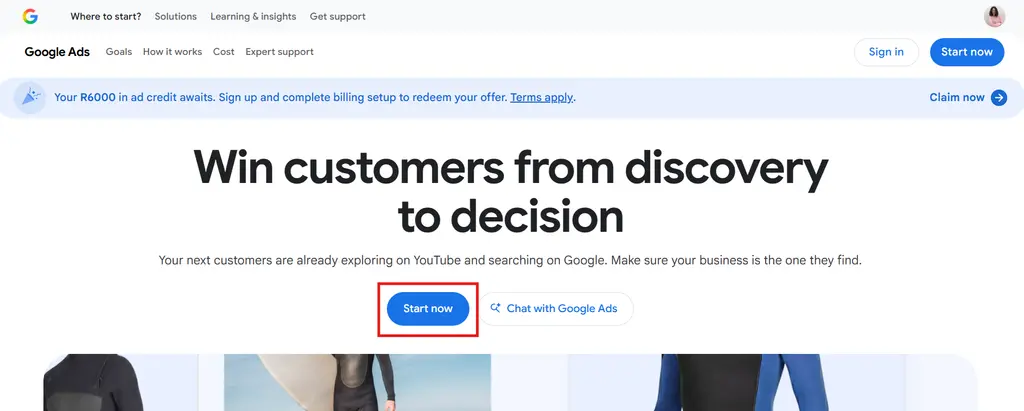
- Go to ads.google.com and click Start now.
- Sign in with your company-owned Google account.
- Enter your business name and website.
- If Google prompts you to create a campaign, skip it. You only need the account for now, and we’ll build the campaigns properly once we have access.
- Carry on to billing, below.
Set up billing
Check each of these before you click through:
- Billing country: the country your business is registered in.
- Currency: the currency you pay in.
- Time zone: the time zone you do business in.
- Company and billing details: your registered business name and address.
- Payment method: the company card or account, not a personal one.
Take extra care with the country, currency and time zone. Google locks these in when the account is created, and they can’t be changed afterwards. Getting one wrong means starting again with a new account.
Ad spend is charged by Google directly to your payment method.
How to give Barrk access
Once your account is created, add our ads manager as an Admin user:
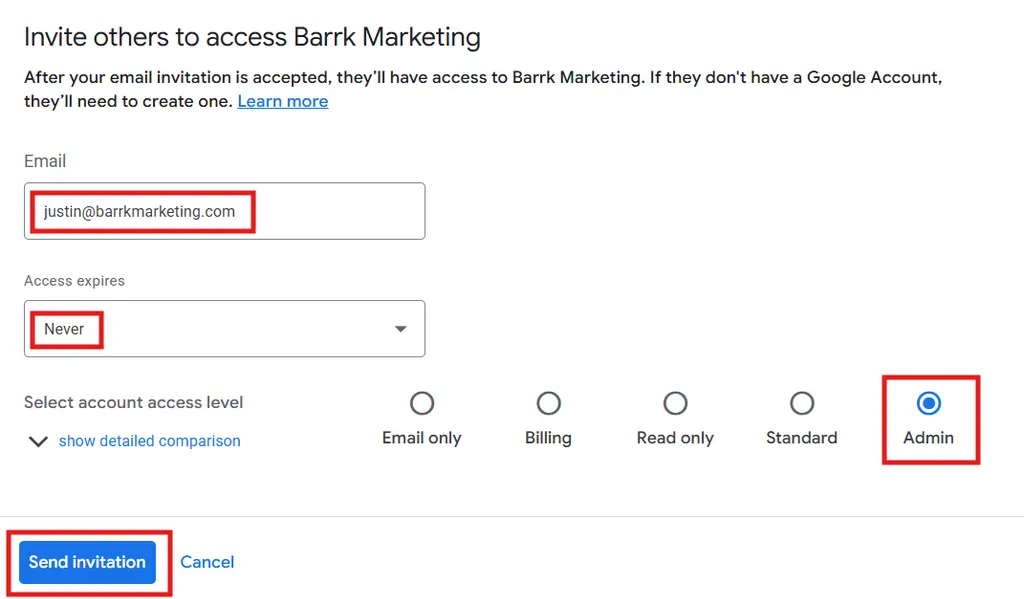
- Click Admin in the left-hand menu.
- Go to Access and security.
- Go to Users
- Click the blue + button.
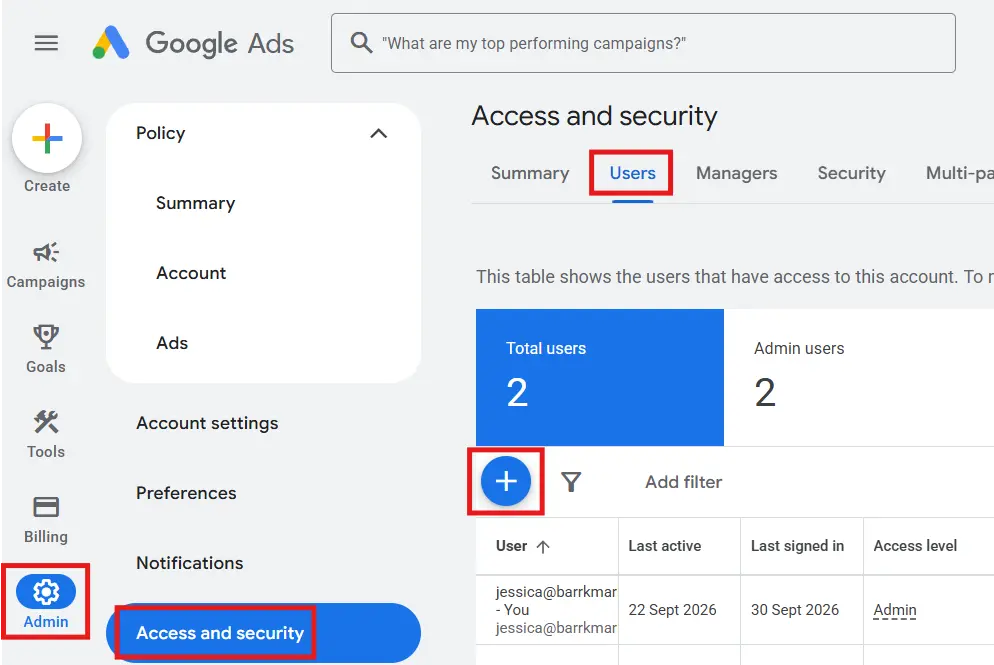
- Enter justin@barrkmarketing.com.
- Keep Access expires on Never.
- Choose Admin as the access level.
- Click Send invitation.
- Then let your Barrk strategist know it’s done.
What happens after setup
Once access is in place, we take over the campaign build, tracking and conversion setup. Nothing goes live and no budget is spent until your strategist has agreed the plan with you.
Common setup problems
- You already have a Google Ads account. Don’t create a new one. Add us as an Admin on your existing account using the steps above.
- The currency or time zone is wrong. It can’t be fixed on the existing account, so a new account is needed. Let your strategist know before you create it and we’ll help you get it right.
- Google created a campaign during signup. Don’t worry, and don’t edit it. Mention it to your strategist once you’ve added us and we’ll sort it out for you.
- You can’t see the + button. Only Admin users can invite others. Check you’re signed in with the Google account that created the Ads account, or ask whoever has Admin access to send the invitation.
Stuck on anything else? Email hello@barrkmarketing.com or WhatsApp us on +27 83 955 5740.